
Why Do Ads Follow You After You Search for a Product?
You search for one pair of shoes and they follow you for weeks. Here is exactly how retargeting works — pixels, datasets, conversion tracking and caching — and how to switch it off.
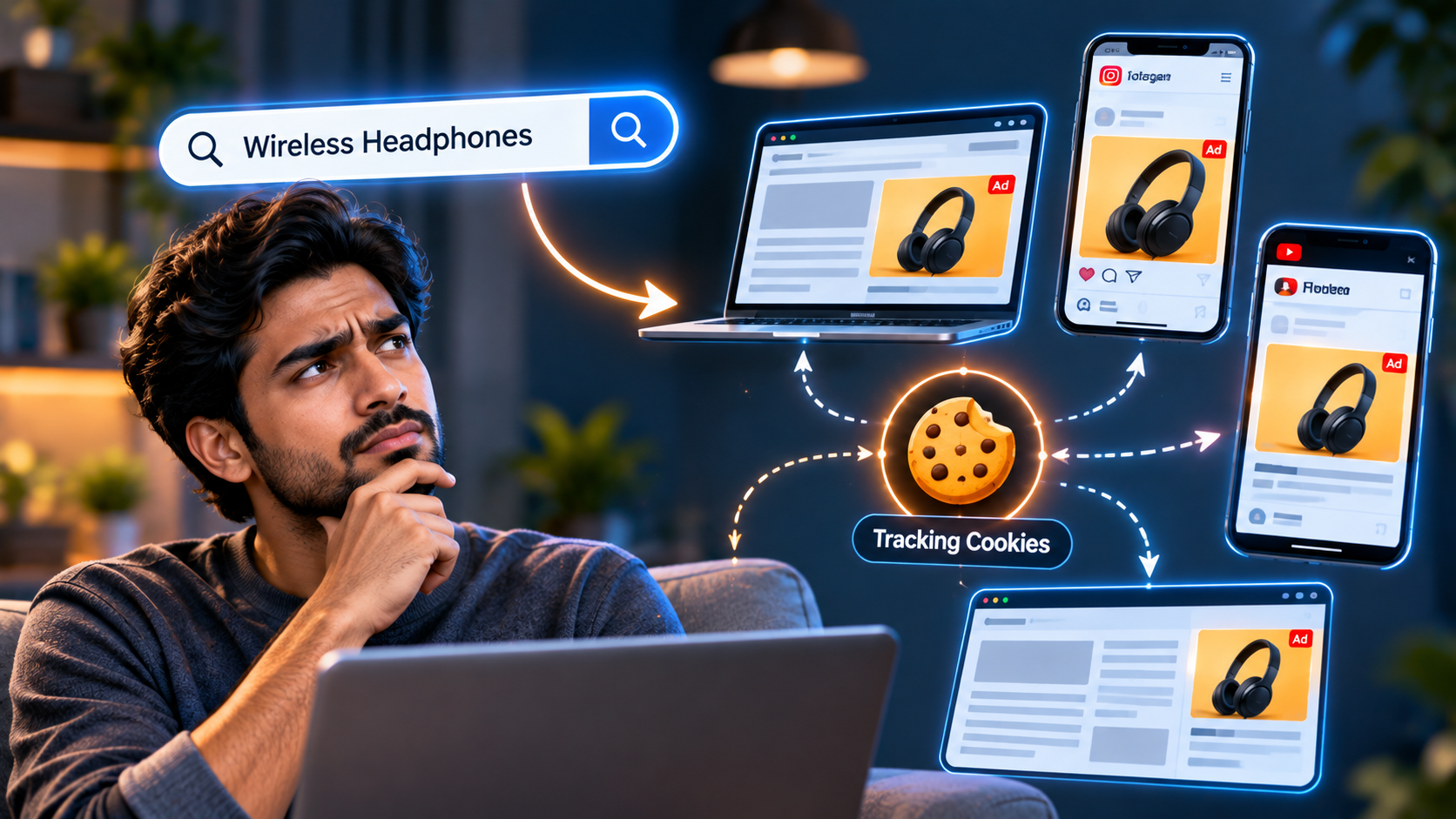
The Short Answer
The website you visited had a small piece of tracking code on it. When the page loaded, that code told Meta or Google — or both — that a browser had viewed a particular product.
You were then added to an audience: a list of people who looked but did not buy. The advertiser bought ads aimed at that list. Every time you opened an app or a website with ad space, an auction ran in the background, and because you were on a valuable list, the shoe company won it.
Nothing about you personally was sent anywhere. What was sent was an identifier, a product, and a timestamp. That is enough.
What Actually Happens in the Four Seconds After You Click
1. The page loads a tracking tag
Within the HTML of the product page is a snippet of JavaScript. It runs as the page renders and loads a small library from Meta's or Google's servers.
2. An event fires
The code reports a named action. Standard ones include PageView, ViewContent, AddToCart, InitiateCheckout and Purchase. Alongside the event it sends context: the product ID, the price, the currency, the page URL, your approximate location from your IP address, and your device and browser type.
3. You join an audience
On the ad platform's side, an identifier for your browser is added to a list — typically something like "viewed a product in the last 30 days but did not purchase". Advertisers do not usually build these lists by hand; they define a rule and the platform maintains the membership automatically.
4. The auction runs
Later, you open an app. Before the page finishes drawing, an auction takes place for the ad slot. Dozens of advertisers bid. The shoe company has told the platform it will pay considerably more to reach someone already on its "viewed but did not buy" list than to reach a stranger — often several times more, because that person is far likelier to convert.
It wins. You see the shoes. The entire process takes a fraction of a second and happens thousands of times a day.
The Meta Pixel — Now Called a Dataset
What it is
The Meta Pixel is a short JavaScript snippet a website owner installs once in the site's header. It is documented publicly in Meta's Pixel developer guide, and it is the single most widely deployed piece of advertising code on the web.
Despite the name, it is not an image. The term dates from an older technique that used a 1×1 transparent GIF to register a page view.
Why it is now called a "dataset"
Meta has renamed the Pixel to a dataset inside Events Manager. The rename reflects a genuine change rather than marketing: a single dataset can now receive events from several sources at once — the browser pixel, a server sending data directly, an app SDK, and offline sales uploaded from a shop — and merge them into one view of the same customer.
In practice, if you read a 2022 tutorial it says "Pixel" and if you open Events Manager today it says "dataset". They are the same thing with a wider mouth.
Custom Audiences and Lookalikes
Two audience types do most of the work.
A Custom Audience is built from people who took an action — visited a page, added to cart, watched a video. Meta's own documentation explains how website Custom Audiences are defined. Membership commonly lasts up to 180 days, which is why an abandoned cart can follow you for months.
A Lookalike Audience goes further. Meta analyses what the people in an existing audience have in common, then finds other users who resemble them. This is why you sometimes see an advertisement for a product you have never searched for, from a brand you have never heard of — you resemble their customers.
Google's Side: Tags, Remarketing and Analytics
The Google tag
Google consolidated its tracking into a single Google tag (`gtag.js`), documented in the Google tag platform reference. One installation feeds Google Ads, Google Analytics 4 and conversion measurement together, rather than requiring a separate script for each.
Remarketing lists
Google calls the same idea remarketing, and its remarketing documentation sets out how lists are built. The reach is the important difference: Google can show those ads across Search, YouTube, Gmail and the millions of sites in its Display Network. Google Ads remarketing lists can hold a member for as long as 540 days — around eighteen months.
Enhanced conversions
Because browser signals have become less reliable, Google added enhanced conversions. When you complete a purchase, the site can send a hashed version of the email address you typed at checkout. The hash is a one-way scramble — Google cannot read the address from it, but it can match it against the hash of an email already associated with a signed-in account.
This is how a purchase made on your laptop gets credited to an ad you clicked on your phone.
Cookies: First-Party, Third-Party, and What Changed
What a cookie actually is
A cookie is a small text file a website asks your browser to store and send back on your next visit. It is how a site remembers your login, your language and what is in your basket.
A first-party cookie is set by the site you are actually on. A third-party cookie is set by a different domain embedded in that page — an ad network, for instance — and that is what historically allowed one company to recognise the same browser across thousands of unrelated websites.
Why third-party cookies are dying — with a twist
Safari and Firefox have blocked third-party cookies by default for years. Google announced it would do the same in Chrome, delayed repeatedly, and then reversed course: rather than removing them outright, it has kept them while continuing to develop its Privacy Sandbox alternatives.
The practical result is a messy middle. Third-party cookies still work in Chrome, do not work in Safari, and advertisers have already built replacements that do not depend on them.
What replaced them
- First-party cookies set by the website itself, which browsers still accept
- Server-side tracking, where data goes from the website's server to the ad platform rather than from your browser
- Hashed email matching, as in enhanced conversions
- Probabilistic matching — inferring that two sessions are the same person from IP address, device characteristics and timing
Removing third-party cookies did not end tracking. It moved it somewhere harder for you to see or block.
Conversion Tracking: How They Know You Bought
Retargeting is only half the system. The other half is measuring whether it worked.
When you complete a purchase, the confirmation page fires a Purchase event containing the order value, the currency and the item. The platform matches that event back to an ad you saw or clicked, and the advertiser learns that ₹1,200 of ad spend produced ₹18,000 of sales.
Attribution windows
A click-through window credits a sale to an ad you clicked within a set period — commonly seven days on Meta. A view-through window credits a sale to an ad you merely saw and did not click, usually one day.
These windows explain a lot of apparent coincidence. A purchase you make on Thursday can be credited to an ad you scrolled past on Wednesday without noticing it.
Why the ad keeps appearing after you have bought
This is the complaint everyone has, and there are four separate causes:
- The purchase event did not fire. An ad blocker, a slow redirect or a payment page on a different domain can stop the confirmation ever being recorded.
- The audience has not refreshed. Membership lists update on a schedule, not instantly. There is usually a lag of hours before a buyer is removed from the "did not buy" list.
- The advertiser never set up an exclusion. Excluding purchasers is a deliberate configuration step. Plenty of advertisers skip it and pay to advertise to people who have already bought.
- A different platform has not been told. Buying through a Google ad does not inform Meta, so Instagram keeps showing you the product.
Server-Side Tracking and the Conversions API
The most significant shift of recent years is that tracking has moved off your browser and onto the advertiser's server.
With Meta's Conversions API, the website's own server sends the event directly to Meta. Google offers an equivalent through server-side tagging. Nothing passes through your browser at all.
The reasons given are accuracy and page speed, and both are real — server-side events are not lost to ad blockers, browser restrictions or a slow connection. The consequence is that browser-based defences no longer see the traffic. A tracker blocker can stop a script loading in your browser; it cannot stop a conversation between two servers it never sees.
Most large advertisers now run both, with a shared event ID so the same purchase is not counted twice.
Caching: Why the Ad Lingers Even After Everything Is Correct
Caching explains the gap between "the system is working properly" and "why am I still seeing this".
Browser cache
Your browser stores the tracking library locally so it does not re-download it on every page. Tracking identifiers also persist in cookies and in local storage. Clearing your browsing history removes the cookie; clearing only the cache often does not.
Audience refresh delay
An advertiser's audience list is not recalculated the instant you act. Platforms rebuild membership periodically, and campaigns read a snapshot of that list. You can buy a product and remain in the "has not bought" audience for hours afterwards simply because the snapshot is old.
Page and CDN caching
Most websites serve pages through a content delivery network that stores a copy of each page. If a tag was added or removed recently, the cached copy may still carry the previous version until it expires — so a site can appear to be tracking you with code its owner has already deleted.
Frequency caps and pacing
Campaigns set limits on how often one person sees an advertisement. When a budget is large and the audience small, those caps are reached constantly, which is why the same creative seems to follow you relentlessly: the advertiser has more money than audience.
"Is My Phone Listening to Me?"
Almost certainly not — and the real explanation is more effective than microphone surveillance would be.
Continuous audio capture would consume battery and data in quantities that are easy to measure, and researchers who have looked for it have not found it happening at scale. What actually produces the effect is inference, and it is very good:
- You searched for something related last week and forgot
- Someone on your WiFi network, or a contact of yours, searched for it
- Your location history shows you visited a relevant shop
- People statistically similar to you buy that product at that time of year
- Frequency illusion — the ad was already being shown to you, and you only noticed after the conversation made it salient
We looked at this in detail in is your smartphone really listening to you. The conclusion is uncomfortable in a different way: they do not need the microphone, because the data trail is more reliable than overheard speech.
Who Collects What
|
Mechanism |
Who Uses It |
What It Captures |
Can You Block It? |
|
Meta Pixel / dataset |
Meta (Facebook, Instagram) |
Page views, cart, purchase |
Partly — browser blockers |
|
Google tag |
Google Ads, GA4, YouTube |
Page views, conversions |
Partly — browser blockers |
|
Third-party cookies |
Ad networks |
Cross-site browsing |
Yes — blocked by default in Safari/Firefox |
|
First-party cookies |
The website itself |
Your visits to that site |
Yes — clear site data |
|
Conversions API |
Meta, via the advertiser's server |
Everything the site knows |
No — never touches your browser |
|
Hashed email matching |
Google, Meta |
Links purchases across devices |
Only by not entering your email |
How to Actually Reduce It
None of this makes you invisible, but each step genuinely reduces what is collected.
- Turn off ad personalisation at the source. Google My Ad Center controls what Google uses about you; Meta has equivalent settings under Ads Preferences. This does not reduce the number of ads, only how targeted they are.
- On iPhone, use App Tracking Transparency. When an app asks to track you, decline. Apple documents the setting here, and you can switch it off globally for all apps.
- On Android, reset or delete your advertising ID in Settings → Privacy → Ads.
- Use a browser that blocks trackers by default — Safari, Firefox or Brave. Our guide to privacy-focused browsing with BAT covers one approach.
- Clear cookies and site data periodically, not just the cache. They are different things.
- Decline non-essential cookies when a consent banner appears, instead of clicking "accept all" to make it disappear.
Be realistic about the limit: none of this touches server-side tracking, because that never involves your device.
The Rules: DPDP, GDPR and ATT
India's Digital Personal Data Protection Act establishes consent requirements for processing personal data, with the Ministry of Electronics and IT maintaining the framework. Europe's GDPR goes further, and is the reason cookie banners exist at all — the GDPR cookie guidance sets out the consent standard.
Apple's App Tracking Transparency was arguably more consequential than any regulation. By requiring apps to ask permission before tracking, and with most users declining, it removed a large volume of signal from advertising platforms overnight — and is the single biggest reason the industry moved to server-side tracking and hashed email matching.
Regulation shapes behaviour, but the pattern is consistent: when one channel is restricted, measurement moves to a channel that is harder to observe. The broader incentives behind that are worth understanding, and we covered the attention economics in the dark side of social media algorithms.
Frequently Asked Questions
Why do ads follow me after I search for a product?
Because the website you visited had tracking code on it — usually the Meta Pixel or the Google tag. When the page loaded, that code reported a product view to the ad platform and added your browser to an audience of people who looked but did not buy. The advertiser then pays extra to show ads to that audience, so you win the ad auction repeatedly.
What is the Meta Pixel, and why is it now called a dataset?
The Meta Pixel is a JavaScript snippet a website installs to report visitor actions to Meta. Meta renamed it a "dataset" in Events Manager because a single dataset can now combine events from several sources — the browser pixel, a server, a mobile app and offline sales — into one view of the customer. The code itself is unchanged.
How long do retargeting ads follow you?
It depends on the audience settings. Meta website Custom Audiences commonly retain a member for up to 180 days, and Google Ads remarketing lists can hold one for as long as 540 days. Most advertisers use far shorter windows — 7, 14 or 30 days — because recent visitors convert better.
Why do I still see ads for something I already bought?
Four common reasons: the purchase event failed to fire because of an ad blocker or an off-site payment page; the audience list has not refreshed yet; the advertiser never configured an exclusion for purchasers; or you bought through one platform while another was never told. Excluding buyers is an optional setting that many advertisers skip.
Is my phone listening to my conversations?
Almost certainly not. Continuous audio capture would produce measurable battery and data usage, and researchers have not found it happening at scale. The effect is produced by inference — related searches you forgot, people on your network, location history, and the frequency illusion where you only notice an ad after a conversation makes it salient.
What is the difference between first-party and third-party cookies?
A first-party cookie is set by the website you are actually visiting and is used for things like keeping you logged in. A third-party cookie is set by a different domain embedded in that page, such as an ad network, and historically allowed one company to recognise the same browser across thousands of unrelated sites. Safari and Firefox block third-party cookies by default.
Did Google actually remove third-party cookies from Chrome?
No. Google announced the removal, delayed it several times, then reversed the decision — third-party cookies still work in Chrome while Google continues developing its Privacy Sandbox alternatives. They remain blocked by default in Safari and Firefox.
What is conversion tracking?
The measurement half of advertising. When you complete a purchase, the confirmation page fires an event containing the order value and items, which the ad platform matches back to an advertisement you saw or clicked. This is how an advertiser learns which campaigns produced sales rather than just clicks.
What is the Conversions API, and why does it matter?
It lets a website send event data to Meta from its own server rather than from your browser. It is more accurate for the advertiser because ad blockers and browser restrictions cannot interfere — and harder for you to avoid, because the data never passes through your device where a blocker could see it. Google offers an equivalent via server-side tagging.
Does clearing my cache stop retargeting?
Not usually. The cache and cookies are different things: the cache stores files like images and scripts, while cookies store the identifier that recognises your browser. To break the association you need to clear cookies and site data. Even then, server-side tracking and hashed email matching can re-identify you at the next login or purchase.
Can ad blockers stop all tracking?
No. A browser extension can block scripts loading in your browser, which stops a large share of pixel-based tracking. It cannot stop server-to-server tracking such as the Conversions API, because that conversation never involves your device. It also does not affect data an advertiser already holds about you.
Is retargeting legal in India?
Yes, subject to consent requirements. India's Digital Personal Data Protection Act sets out obligations around collecting and processing personal data, and websites are expected to obtain consent for non-essential tracking. Enforcement is still maturing, and practice across Indian websites varies considerably.
Conclusion
The shoes follow you because a few lines of code on one website put your browser on a list, and the company selling those shoes is willing to pay several times more to reach a name on that list than to reach a stranger. That is the whole mechanism. No microphone, no conspiracy, no individual watching you.
What makes it feel invasive is not sophistication but persistence. The list has an expiry date measured in months, the refresh is slow, and most advertisers never bother to remove people who have already bought.
You can reduce it meaningfully. Turn off ad personalisation, decline tracking prompts on iPhone, reset your Android advertising ID, use a browser that blocks trackers, and clear cookies rather than just the cache. Each step removes real signal.
What you cannot do is opt out entirely, and it is worth being clear about why: the industry has already moved the most valuable measurement to a place your browser never sees. Server-to-server tracking does not care what your device blocks. The honest position is not that privacy tools are useless — they are not — but that they manage the problem rather than solve it.
At least now, when the shoes appear for the eleventh time, you know exactly which database you are in and roughly when you will leave it.







0 Comments